
Your media.
Your channels.
MosaicTV turns your shows, movies and music into 24/7 channels that run like real TV — station breaks, up-next cards, a broadcast clock and a guide — and plays them in Plex, Jellyfin, Emby, any IPTV app, or right in your browser.

Click the picture or press ↑ ↓ to flip. Every frame went out on a real MosaicTV, as it aired.
Every channel, live, on one screen.
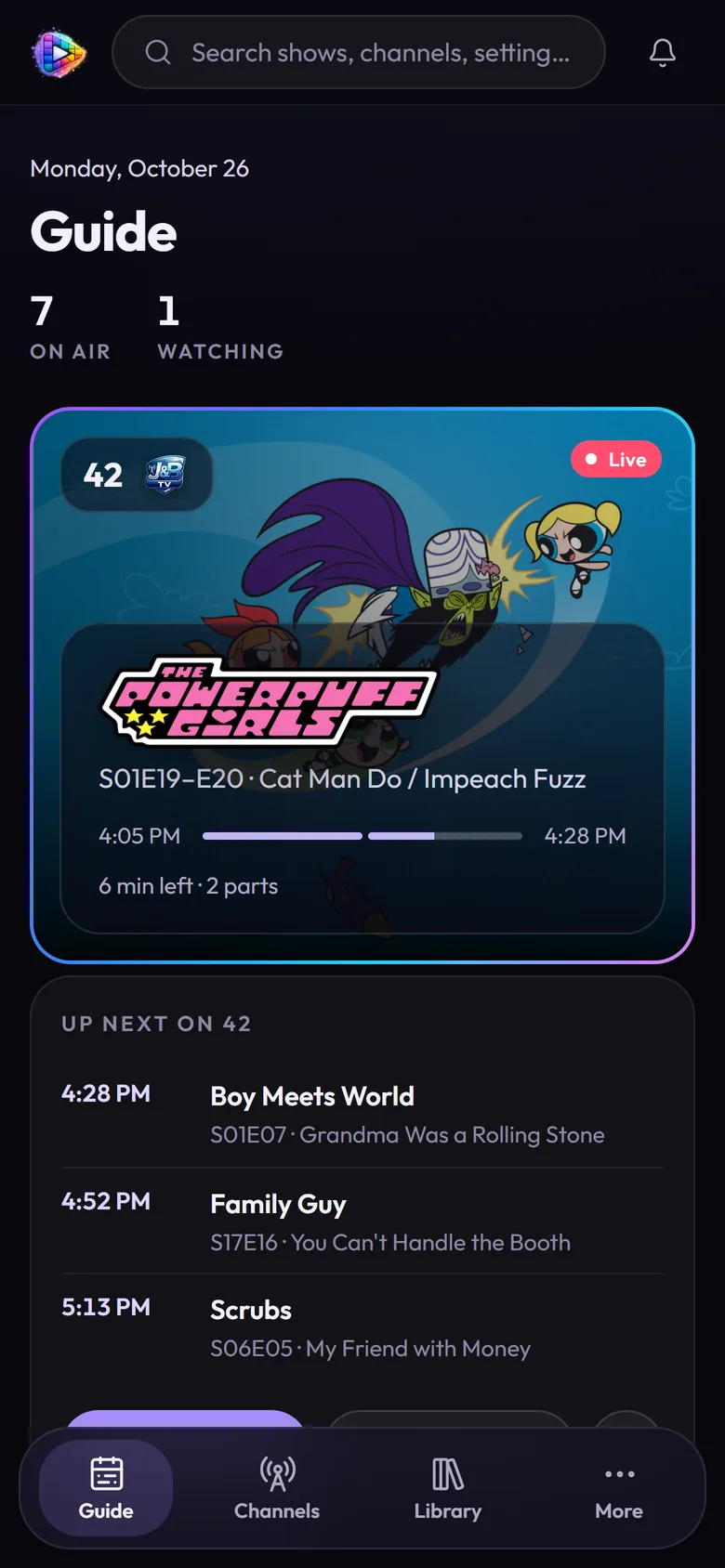
The Guide is home: one channel large at the top with its live picture, the show's logo and what's up next, and every channel in the grid below. Click a picture and you're watching it.

Cartoons air as the half-hours they were.
A half-hour of Dexter's Laboratory was three seven-minute cartoons. 2 Stupid Dogs ran a Super Secret Secret Squirrel short between its two dog cartoons. Your files list every short as its own episode — the squirrel as another show entirely — so most tools air them as slivers, shuffled apart. MosaicTV puts them back together.
2 Stupid Dogs on Cartoon Network, 8:00 PM
Group them once. They air together forever.
- Suggest groupings packs a season's shorts into 11-, 22- or 30-minute slots to start from. Tick, group, reorder or ungroup from there.
- Borrow a segment from another show — each 2 Stupid Dogs half-hour gets its Secret Squirrel short back, right where it aired.
- One program in the guide, one up-next card naming every part. No playback order, block or exact-time start ever splits it.
- Nothing on disk changes. Your files keep their names and their real season and episode numbers.

And every page knows what's really on.
Each episode says which broadcast episode it belongs to, and the borrowed short says whose half-hour it airs in. The show's page has the evening it's on, with tonight's airing named part by part.

Runs like a station. Edits like a playlist.
A 24/7 rotation, time blocks for the days and hours that are different, and a broadcast clock that starts shows on the :00 and :30. Change anything, any time — the guide follows from the next program, and every show carries on from the episode it was up to.

New channel makes one in three steps: name it, tap the posters of what it plays — the preview adds up how long it all runs — and choose all day or blocks. That's a channel, on the air, with its guide built.
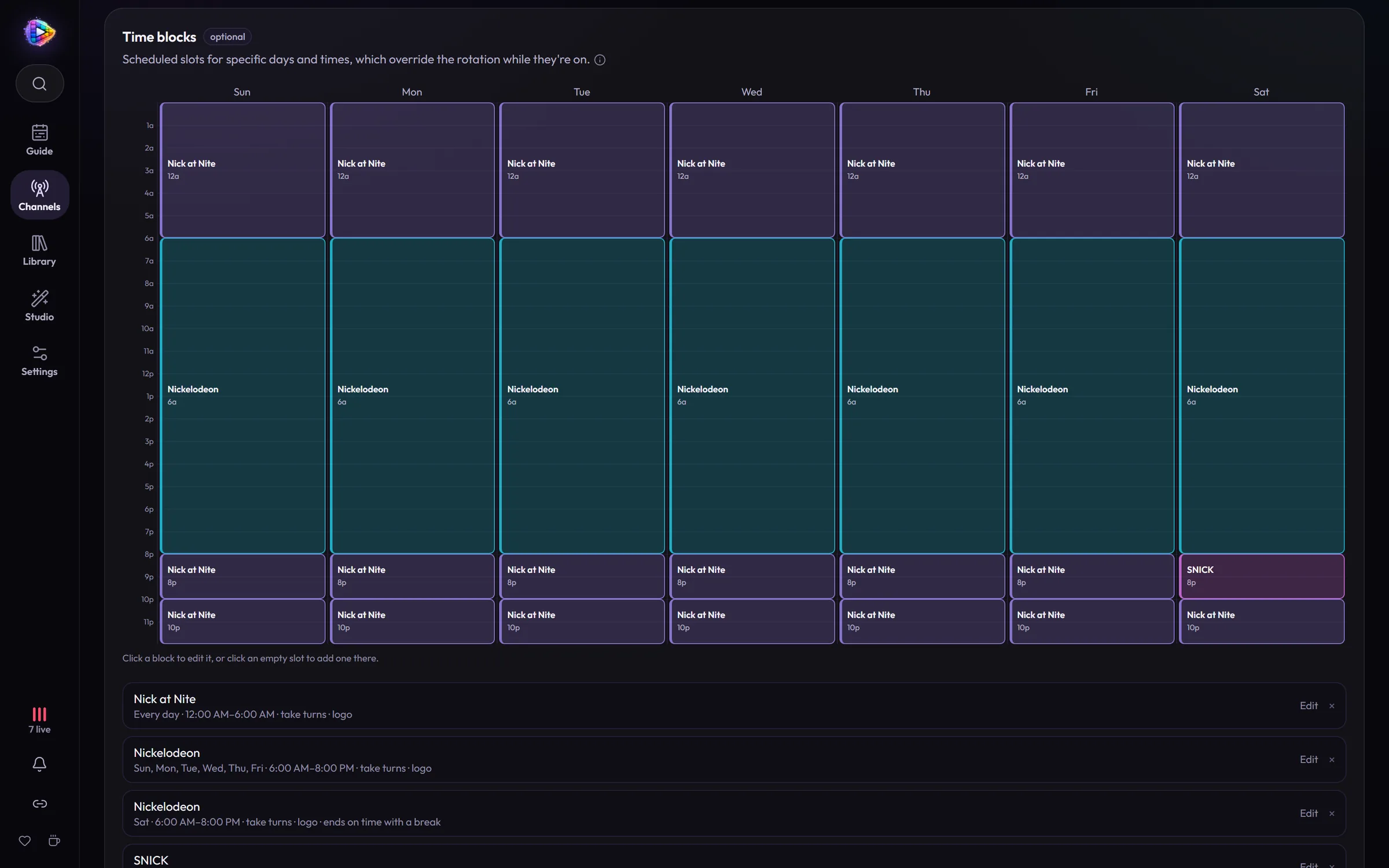
Nickelodeon, the way it ran in 1996: Nickelodeon by day, Nick at Nite every night, and SNICK on Saturdays from 8 — a hard start on a half-hour clock, so Clarissa, Kenan & Kel, Ren & Stimpy and Are You Afraid of the Dark? each get their slot. Each block can have its own logo, order, breaks and up-next card.

Give a block a season — October, Christmas, the holidays, summer, or any dates — and it takes its hours only then. Here, Turkey Thursdays: Thursdays from 5 to 10 PM, November 1 to 30, every year. Holiday episodes keep to their season too: Christmas episodes at Christmas, wherever they fall in a show's run. A whole year on one channel ↓

Weeks ahead lays the schedule out two months out — how late each block really starts, break time a day, and when each show starts over. The Schedule tab warns you before it airs: a block that will run into an exact-time start, specials airing first.

Collections are whole shows, seasons, episodes, movies, artists or albums — or a smart filter like “every horror movie” — as a poster grid you drag into order. Five playback orders, each explained as you pick it, with a preview of the first airings.

The guide grid: a red now-line, broadcast episodes with their parts and breaks marked, music as hour blocks — and it's the same XMLTV your players get.
Halloween, Thanksgiving, Christmas. One channel.
Channel 13 on the MosaicTV in these pictures is the Holiday Channel, and every one of its blocks has a season: seven Halloween dayparts in October, five of Christmas from November 1, Thanksgiving movies on November Thursdays, and A Christmas Story around the clock from Christmas Eve. It changes over by itself at midnight, every year.
A day on channel 13, four times a year
6 AM to 6 AM, as it's scheduled
Fifteen blocks. Set once.
- Seasons stack. The five Christmas blocks run November 1 to December 31; Turkey Thursdays sits inside them and takes 5 to 10 PM on November Thursdays. The shorter season wins, so nothing clashes.
- Each holiday has its own look. The Halloween blocks put the jack-o'-lantern logo in the corner; the rest, the Holiday Channel's.
- A one-night special, every year. A Christmas Story from 8 PM Christmas Eve to 8 PM Christmas Day is two blocks, a day's season each.
- Nothing to switch. At midnight on Halloween the last horror movie plays out, and Christmas starts. Next October, Halloween comes back on its own.

And it knows where each season stands.
Weeks ahead lists every block with its season: the Halloween ones out of season until October 1, the Christmas ones in season until December 31, and how late each really starts. The Schedule tab says when a season is about to start or has just ended.

Breaks that look like a network made them.
Breaks cover the time between programs so blocks start on time. MosaicTV makes each channel's idents from its own logo, with a music bed — or plays your bumpers and old commercials from a folder, a fresh mix every break.
Mosaic Default
Your logo on a wall of glass tiles, with rings of light spreading out from behind it.
Frosted glass
Rows of logos gliding behind frosted glass, with lights drifting past at different depths.
Both are drawn from whatever logo is on the air, with your music under them. Or use a clip of your own, or a folder of old bumpers and commercials.
Commercial breaks where the commercials were.
- Act breaks found for you — from a file's chapter marks, or from its fades to black and silence when it has none.
- Breaks inside programs: on a clock, each slot's break time is shared across the episode's act breaks, the way it aired.
- One place to set it up. Each channel's Breaks tab shows when the next break is and what it'll play, a week map coloured by the ident each block plays, and a warning when an ident would never air.
- Per-block idents — Nick at Nite's own for the Nick at Nite blocks. Preview six seconds of any ident before you save.

And a promo for what's on later.
A break can end on twelve seconds promoting something later on the channel — Tonight at 5:30, Saturday at 9 AM — with its backdrop and poster, picked from the guide as the break airs: movies, blocks starting, broadcast episodes, premieres and prime time first.

An up-next card worth staying for.
Near the end of a program, a card slides in naming what's on next: the time it starts, the show's or movie's logo, the episode — and every part of a broadcast episode. Five looks to pick from.
- Art banner fills a bar with the next program's artwork; Logo bar stands its logo up out of a slim glass bar; Snipe slides out from behind your channel's own logo; Preview is a little screen of what's next; Coming up lists the next program and up to four after it.
- Any corner or edge, three sizes — and a card never covers your logo: it steps clear of it.
- A broadcast episode gets one card, naming every part — the borrowed short included.
- A live preview in each channel's settings, with the channel's real next program.

Drawn by MosaicTV itself, as each channel's settings preview them.
Channel surfing, in a browser tab.
TV mode puts your channels full screen: a slim glass strip with the show's logo, its parts and what's next as you tune in, and the guide over the picture. Flip with the arrow keys or a swipe, or type a number. Cast it to a Chromecast, Google TV or Apple TV — or add the channels to the player you already use.

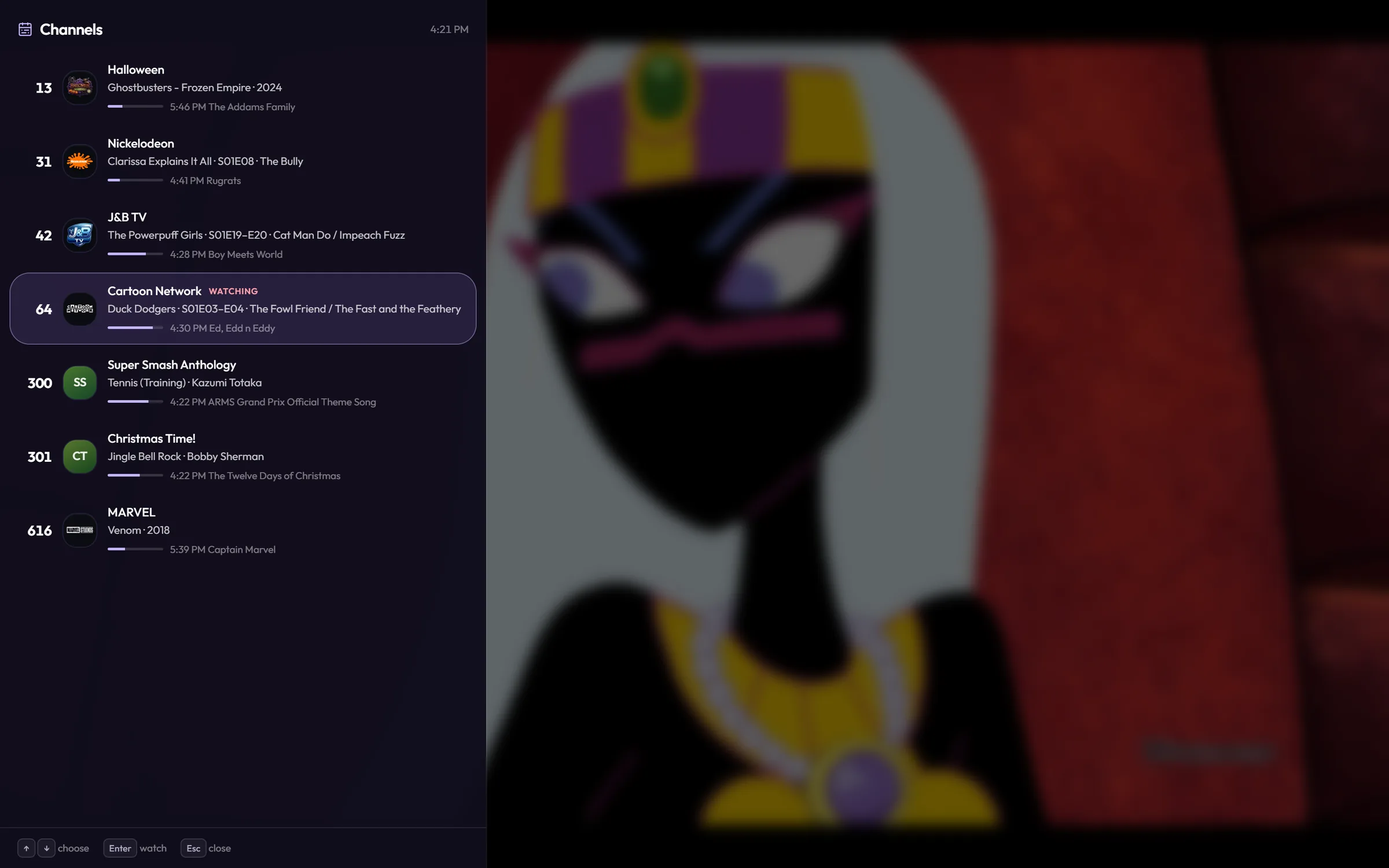

Looks put the shows back on the set they aired on: a CRT's scanlines and curve, an old TV set round a 4:3 program, and the guide in the blue cable-guide look.
Plex, without Threadfin
A built-in HDHomeRun tuner: give Plex its address and Live TV takes the channels, logos and guide straight from MosaicTV.
Jellyfin, Emby, any IPTV app
Standard M3U and XMLTV. Live TV setup, the link icon in the rail, has every address with a copy button and steps for each player.
One encode, any number of viewers
One encode per channel however many people tune in — as MPEG-TS or shared HLS — and only channels someone is watching are encoded at all.
A guide channel, for players with no guide.
Like the old cable guide channel: a channel whose picture is every other channel's now and next, ninety minutes of the grid scrolling up the screen with a clock and a window on something that's on — so a player that can only tune channels can still see what's on. In the classic blue, or the app's own look.

Music channels with a now-playing screen.
Songs from your own files air over their album art, a spectrum drawn from the song, or its lyrics, lit line by line as they're sung.
- What played before and what's next along the bottom, and where the song sits on its album.
- Take turns by artist — a station of forty artists plays one song from each in turn, and shuffle never plays the same artist twice running.
- Filed like a music app: artists, albums and songs by album artist, compilations under Various Artists, disc sets as one album.
- MusicBrainz, Cover Art Archive and LRCLIB fill in albums, covers and synced lyrics — free, no keys.
- One block an hour in the guide, named after its collection, with the set list a click away.

A library that knows what's on.
A scanner reads your folders the way Plex does — .nfo files, the files' own tags, TMDB and TheTVDB — or takes a library straight from your Plex, Jellyfin or Emby server. Posters, backdrops and title logos, and every title's page shows where it's on the air: the channels carrying it, its next airing, and the evening around it.


Specials and extras are switched per channel, every title has Tune in and Add to a channel, and Fix match puts a wrong poster right on either source.
The details a station needs.
Search from anywhere
Ctrl/⌘ K finds pages, channels, settings and every show, movie and artist in your library.

Logos and watermarks
Studio keeps your logos, each with its own watermark — permanent or every few minutes with fades, any corner and size — previewed live over a frame from your library.
GPU encoding, verified
NVIDIA, Intel QuickSync, VAAPI, AMD AMF or Apple VideoToolbox, each proven by a real test encode on your host — with a clean CPU fallback.
Even volume, your language
Loudness normalization, ready-made profiles from 720p to 4K, and a preferred audio language per channel.
Notifications
A bell follows scans, metadata fetches and ident builds with live progress, wherever you are in the app.
What aired
Ninety days of what actually went out on each channel, and whether it streamed cleanly — on the channel's On air tab.
Sign-in for away from home
Turn it on and away from home it's a password or a code you approve, while home still gets straight in — and players get links of their own.
Backups and safe upgrades
Backup and restore from Settings, a copy taken before any upgrade changes the database — put back by itself if the change fails — and a log to download for bug reports.
Runs the station from your phone.
The whole app works on a phone — a tab bar along the bottom, long-press menus, Add to a channel from any title — and spreads out with more columns on a 4K monitor.


A whole station, in one container.
Channels that look and feel like broadcast TV, set up by clicking — and every feature free, for everyone.
| Cartoons made as shorts | Group any segments into the broadcast half-hour they aired as — including a short from another show. One program in the guide. |
| Station breaks | Idents made from your logo (Mosaic, frosted glass) with a music bed, or a reel from a folder of bumpers and commercials — and promos for what's on later. |
| Commercial breaks in a show | At chapter marks, or found from fades to black and silence when a file has none. |
| Up next | Five card looks with the next title's logo — Art banner, Logo bar, Snipe, Preview and Coming up — picked with a few clicks and previewed live. |
| Scheduling | A new channel in three steps, a rotation plus time blocks, seasons, a broadcast clock, five playback orders, schedule warnings and a weeks-ahead view. |
| Library and metadata | Its own scanner, reading .nfo, tags, TMDB and TheTVDB, or your Plex, Jellyfin or Emby server — and MusicBrainz, the Cover Art Archive and LRCLIB for music. |
| Watching | Any IPTV player, Plex through its built-in tuner, a guide channel for players with no guide, or TV mode in the browser with looks and casting. |
| Away from home | Sign-in with a password or a code you approve, links of their own for players — or a VPN. |
| Music | A now-playing screen with album art, a visualizer or synced lyrics. |
| Encoding | One shared encode per channel, only while someone's watching — on NVIDIA, Intel, AMD or Apple hardware, or the CPU. |
| Runs on | Docker on any 64-bit Intel or AMD host: Unraid, a NAS, Proxmox, any Linux box. |
| Price | Free and open source, GPL-3.0. |
On the air in ten minutes.
One container with everything in it. Point it at your media, open the web UI, and build your first channel.
- Run the container with your media mounted read-only — MosaicTV never writes to it.
- Add a library and scan it. Add a free TMDB key for posters and details if you like.
- Make a channel: name it, pick what it plays, choose when. Its guide builds itself.
- Watch on the Guide or in TV mode, or add the M3U and guide to your player.
docker run -d \
  --name mosaictv \
  --restart unless-stopped \
  -p 8688:8688 \
  -e TZ=America/Chicago \
  -v /path/to/appdata/mosaictv:/app/data \
  -v /path/to/your/media:/media:ro \
  ghcr.io/tronvondoom/mosaictv:latest
Then open http://your-server:8688. Add --gpus all for an NVIDIA card.
services:
  mosaictv:
    image: ghcr.io/tronvondoom/mosaictv:latest
    container_name: mosaictv
    restart: unless-stopped
    ports:
      - "8688:8688"
    environment:
      - TZ=America/Chicago
    volumes:
      - /path/to/appdata/mosaictv:/app/data
      - /path/to/your/media:/media:ro
# On the Unraid terminal:
curl -L -o /boot/config/plugins/dockerMan/templates-user/my-MosaicTV.xml \
  https://raw.githubusercontent.com/TronVonDoom/mosaictv/main/unraid/my-MosaicTV.xml
Then Docker → Add Container → MosaicTV, point it at your media share and set your timezone.
:latest is the newest release; :edge follows every change. Full guides in the
install docs.
What to run it on
Only channels someone is watching are encoded, and everyone on one channel shares its encode — so size the server by how many different channels are watched at once.
| Light | Recommended | Heavy | |
|---|---|---|---|
| Channels watched at once | 1–2 | 3–5 | 6 or more |
| CPU | 4 cores, from about 2015 on | 4–6 cores | 6–8 cores |
| GPU | None — the CPU encodes, at 720p | Intel, AMD or NVIDIA; NVIDIA GTX 1050 or newer for HEVC files | NVIDIA RTX |
| RAM | 4 GB | 8 GB | 16 GB |
Every tier: a 64-bit Intel or AMD Docker host, an SSD with about 10 GB free for app data, and a wired connection. Bandwidth per viewer, measured numbers and GPUs to avoid are in the hardware guide.
Good to know
Is it really free?
Yes — every feature, for everyone, under the GPL-3.0. If it earns a spot on your server, you can sponsor it or buy it a coffee, but nothing is held back.
Will it change or move my files?
No. Mount your media read-only; MosaicTV only reads it. Broadcast episodes, matches and everything else live in its own database.
What hardware do I need?
Any 64-bit Intel or AMD machine that runs Docker — Unraid, a NAS with an Intel or AMD CPU, Proxmox, any Linux box. Only channels someone is watching are encoded, so a 4-core CPU copes with a channel or two at once; a GPU makes light work of more. See what to run it on. There's no ARM image yet.
Does it work with Plex?
Yes. MosaicTV includes an HDHomeRun tuner: enter its address in Plex's Live TV & DVR setup and Plex takes the channels and guide directly — no Threadfin or xTeVe in between.
Can I watch away from home?
Yes. Use a VPN into your home network, such as Tailscale or WireGuard, or turn on sign-in (Settings → Sign-in): a password or a code you approve away from home, while home still gets straight in, and players get links of their own. Out of the box there's no login, so turn sign-in on before anything from outside can reach it.
Do I need TMDB or TheTVDB?
No. .nfo files and local artwork work on their own. A free TMDB or TheTVDB key adds posters, backdrops, cast and episode details for everything else.
Where can I ask a question, or show off my channels?
On r/MosaicTV — questions, ideas, and the lineups people have built. Bugs go to GitHub issues, with the log download from Settings if you can.
Where do these screenshots come from?
A MosaicTV running at home: Cartoon Network as it was around 2001, Nickelodeon's 1996 lineup, a holiday movie channel that's Halloween in October and Christmas through December, a Marvel channel and a video-game music station, among others. The TV and now-playing pictures went out on those channels as they aired; the up-next cards, the promo and the guide channel are MosaicTV's own previews of them; the idents are drawn from the same channels' logos.
Your channels are waiting.
Remember channel surfing? Bring it back — with every channel made from your own library.